Daily Estimated Usage — Hourly Services
Overview
The Daily Estimated Usage feature provides an estimate of usage and cost for hourly-billed services during the current calendar month.
The figures shown are estimates intended to help users understand how usage and cost are accumulating. They are not final invoice amounts.
The figures shown on this screen are indicative estimates designed to provide real-time visibility into usage accumulation. For final billed amounts, refer to your official invoice or account statement.
What This Feature Provides
1. Hourly Services Only
- The feature is available only for services billed on an hourly cycle.
- The service selector displays hourly services available on the account (intended for active services in this release).
- Monthly and other fixed-cycle services are not included.
- Users can select and view one service at a time.
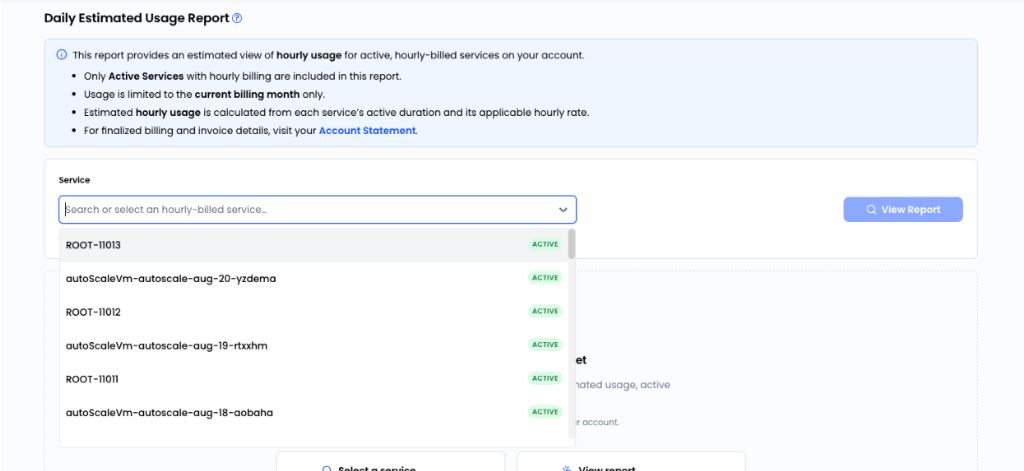 Figure 1: Service selector displaying active hourly-billed services.
2. Current Month Usage
All views use the current calendar month as the reporting period.
For a service within that month, the report period is limited to the time during which the service actually existed:
- Start: Service creation date/time when the service was created during the current month; otherwise the portion of the month from the 1st within the service’s lifetime.
- End: Current date/time for an active service (within the current month).
Earlier months are not displayed in this feature.
3. Summary View
The summary displays information for the selected hourly service, including:
- Service details: Service name and status (e.g., Active)
- Estimated hourly rate for the period (see Displayed rates below)
- Report period: Start and end timestamps
- Total estimated hours: Accumulated billable hours for the period
- Total estimated amount: Accumulated estimated charges
The displayed values represent estimated usage accumulated during the current reporting period.
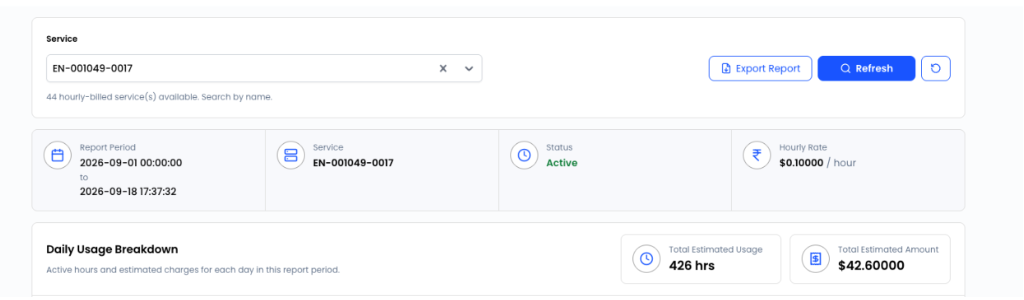 Figure 2: Summary panel showing report period, service, active status, hourly rate, total estimated hours, and total estimated amount.
4. Daily Breakdown
The daily breakdown provides usage information for each day in the report period.
Each daily row may include:
- Date: Calendar date and day of week
- Status: Service status
- Active time range / Billable duration: When there was billable usage (e.g., Full day 24 hours or partial time such as 9 hours (3:34 PM – End of day))
- Estimated hours: Billable hours for that day
- Rate (/ Hour): Estimated hourly rate for that day (when hours > 0, derived from that day’s amount and hours)
- Estimated amount: Estimated charge for that day
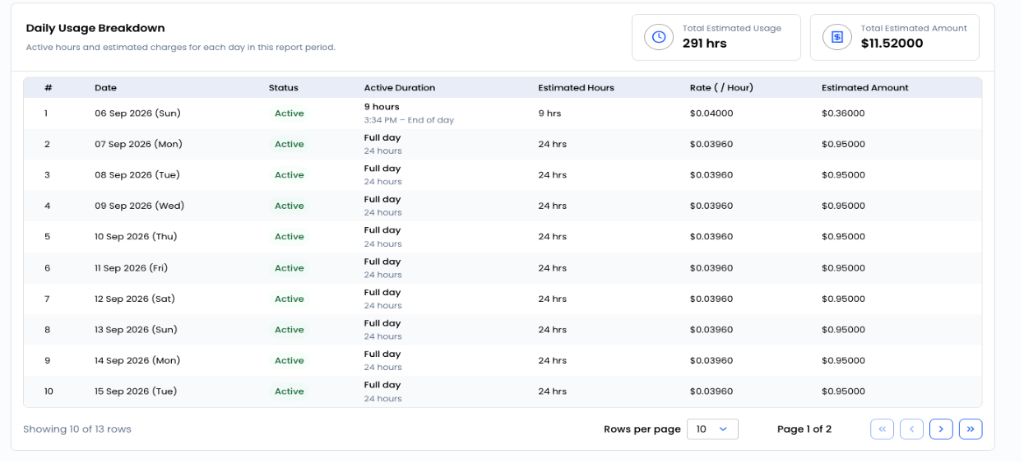 Figure 3: Daily breakdown table showing active duration, estimated hours, rate per hour, and estimated amounts.
Days with No Billable Usage
Days with no billable usage are included when they fall within the report period and show zero estimated hours (and zero amount).
For example, an active VM that was stopped for part or all of a day may appear with zero billable hours:
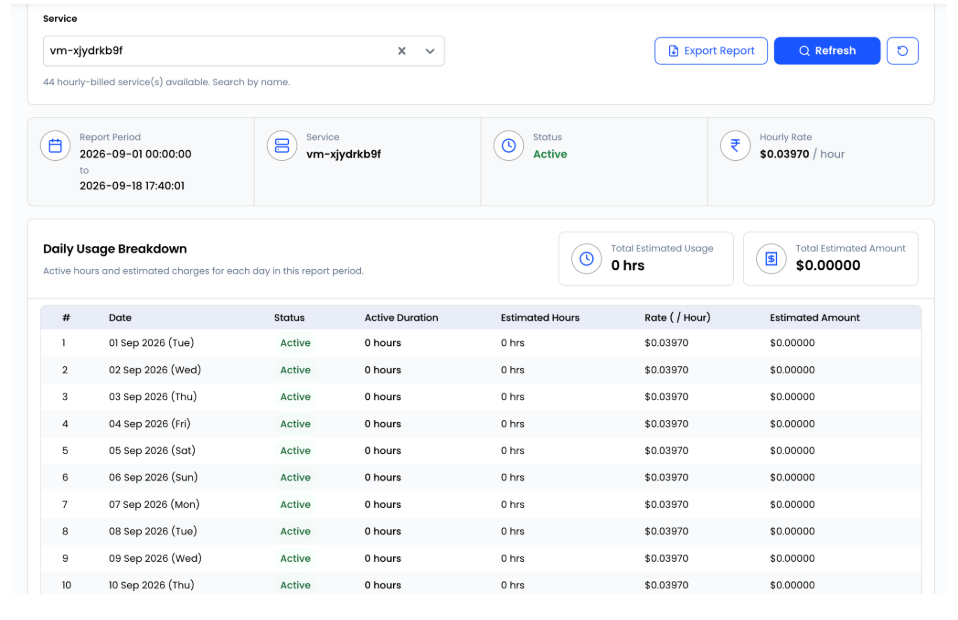 Figure 4: Active service displaying zero billable hours and $0.00000 estimated amount for inactive/stopped days.
5. Excel Export
Users can export daily estimated usage for the selected service to an Excel file.
- Click Export Report above the summary cards to generate and download the report.
- The export includes all daily rows for the current month for the selected service (same columns as the daily breakdown, including rate, hours, and amount).
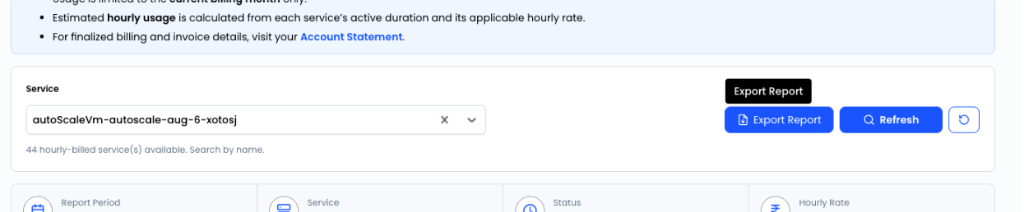 Figure 5: Export Report button available on the top right.
Alignment with Hourly Billing
Estimated usage follows the platform’s configured hourly billing behaviour.
Depending on service configuration, calculation may include:
- Hourly Billing Rate (underlying): Billable hours use the applicable rate from billing/offering or an active usage invoice item, when no per-hour logged price applies.
- Recorded Hourly Usage: Where hourly usage has already been recorded for specific hours, those logged prices are used when calculating the amount for those hours.
- Bill Only When Running: When bill-only-when-running is enabled and applies, only running time is billable. A stopped VM may remain active but show zero billable hours for that period.
- Trial Services: If trial rules suppress billing, usage in that period is not treated as billable until trial rules allow it.
Displayed rates (summary and daily)
- Summary hourly_rate: When total hours > 0, the shown rate is the effective estimated rate for the period:
total estimated amount ÷ total estimated hours(presented to four decimal places). - Daily rate: When hours > 0, the shown rate is the effective estimated rate for that day:
that day’s amount ÷ that day’s hours(four decimal places). - Zero hours: When hours are zero, the daily rate may reflect the configured default hourly rate from billing context, or zero, depending on the case.
This keeps displayed rates aligned with estimated amounts, including when logged hourly usage uses small per-hour prices.
Service Validation
The system validates the requested service before generating the report.
If the requested service:
- Does not exist,
- Is not available to the account, or
- Is not configured for hourly billing,
the user receives a clear validation error (no partial or misleading report data).
Validation does not use a separate “inactive” flag; deleted resources are typically excluded because they no longer appear in the service list and billing subscription data in normal flows.
Reseller Support
The same capability is available in the reseller portal for managed customer accounts, subject to billing permissions and role access.
Limitations
Displayed hours and amounts are indicative. Final invoice amounts may differ due to adjustments, credits, taxes, rate changes, promotions, discounts, or other billing events. Do not treat estimates as final amounts due.
Monthly, quarterly, yearly, or other fixed-cycle services are not supported on this screen.
The current release targets active hourly services in the selector. Deleted or removed services are not included; usage for a resource removed during the month cannot be viewed through this release.
Users cannot choose a previous month, future month, or custom date range. Use invoices and other billing views for historical periods.
No combined multi-service or account-wide estimated usage total on this feature.
Days with no billable usage may still appear with zero hours and zero amount; status may still show as active when the resource is not deleted.
- Amounts are rounded to two decimal places per day (and in totals).
- Rates are shown to four decimal places.
- Because amounts are built from hour-level prices (including logged hourly usage),
hours × displayed ratemay differ slightly from amount on a given day after rounding, even though the rate is derived from amount and hours.
“Current month” follows the platform configured timezone, which may differ from a user’s local timezone.
Unconverted or problematic usage from earlier months is not shown here; it is handled through normal billing and invoice processes.
Hourly service list, summary, daily usage, and Excel export require the appropriate billing permissions.
Other analytics or service usage reports may use different rules, periods, and sources; figures may not match Daily Estimated Usage.
Navigation & Related Links
Navigation Path
- Customer Portal: Navigate to Billing → Daily Estimated Usage Report (or via the Customer Billing Dashboard).
- Reseller Portal: Navigate to Billing under the managed customer account.
Related Documentation
- Customer Billing Dashboard — Main customer billing overview and tab directory
- Account Statement — Invoices, usage records, free trials, and contracts
- Usage Details — Breakdown of usage records according to payment mode (Prepaid Model 1/2 vs Postpaid)
- Billing Overview — CMP billing concepts, ledger rules, and architecture