Usage Details
Usage Details shows the customer’s service consumption lines under Billing → Account Statement → Usage Details. Providers use this page to explain “what am I being charged for?” to end customers.
Customer path: Billing → Account Statement → Usage Details
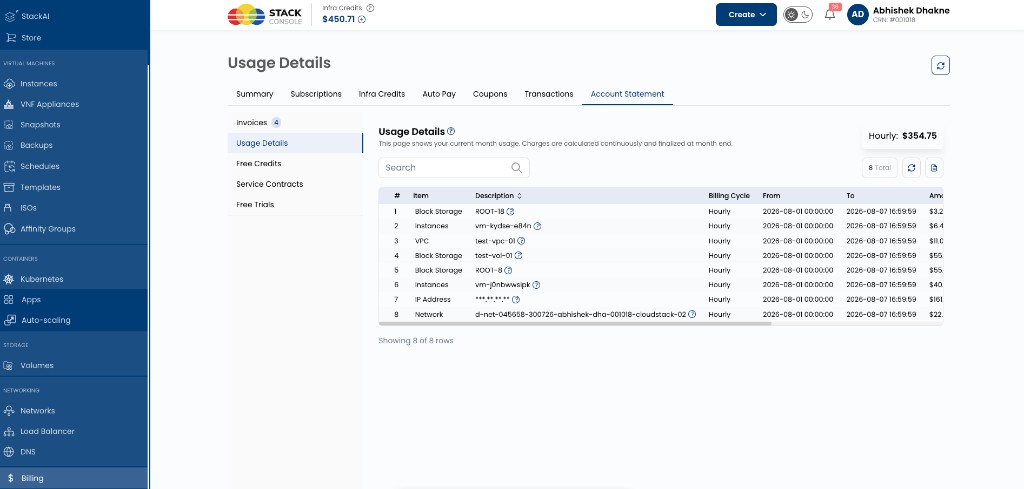
The page description in the portal typically states that charges are calculated continuously and finalized when the related invoice cycle closes (for modes that invoice services).
What appears on Usage Details is not the same for every account. It depends on:
- Payment mode — Prepaid vs Postpaid / Manual
- For Prepaid only — Global Setting
generate_prepaid_reciept(Model 1 vs Model 2)
Quick reference
| Payment mode | generate_prepaid_reciept | What Usage Details shows |
|---|---|---|
| Prepaid | false (Model 1 — invoices on infra credits) | Usage for active and inactive subscriptions, from account creation to till now |
| Prepaid | true (Model 2 — invoices on services) | Only subscriptions / periods whose service invoices are not yet created (typically current month open usage) |
| Postpaid / Manual | Not used | Open usage for services / periods that are not yet invoiced (same idea as Model 2: show what is still accumulating) |
How to read the table
Typical columns:
| Column | Meaning |
|---|---|
| Item | Service type (for example Instances, Block Storage, VPC, IP Address, Network) |
| Description | Resource name or identifier |
| Billing Cycle | Hourly, Monthly, and so on |
| From / To | Period covered by this usage line |
| Amount | Calculated charge for that period |
A summary (for example Hourly: $354.75) may show totals for the lines currently listed.
Customers can search, refresh, and export the list from the page toolbar.
Scenario A — Prepaid + Generate prepaid receipt = false (Model 1)
Global Settings: generate_prepaid_reciept = false
Meaning: Wallet top-ups generate infra-credit invoices. Service usage is deducted from the wallet and tracked for reporting — service invoices are not created.
What the customer sees
Usage Details lists usage for:
- Active subscriptions
- Inactive (ended / deleted) subscriptions
Time range: from account creation through till now (full history of tracked service usage on the account).
Because services are never invoiced separately, this tab is the customer’s ongoing view of consumption against the wallet — not only the current month.
Example (Model 1)
| Fact | Value |
|---|---|
| Account created | 1 May 2026 |
| Customer opens Usage Details | 7 August 2026 |
| Services | Hourly VM since May; monthly volume created in June (later deleted) |
Usage Details shows:
- Hourly VM usage from May → August (till now)
- Monthly volume usage for the period it existed (even though inactive now)
- Other active/inactive lines from account creation onward
Does not mean: only August. History remains visible because no per-service invoices “close out” those lines.
Portal copy (Model 1)
The Usage Details heading uses a short note and an info popup (long note).
Short note (below the heading):
This page displays the cumulative usage of all active and inactive subscriptions from the time the account was created until the present.
Long note (popup):
Usage is tracked in real time (hourly for hourly-billed services). Charges for active subscriptions are continuously accumulated and displayed on this page. This page shows usage only; invoices are generated separately against your infrastructure credit.
Point them to the short note and popup on the page. In short: wallet invoices are for infra credits; Usage Details is cumulative service usage (active and inactive) from account creation — not a service invoice list.
Scenario B — Prepaid + Generate prepaid receipt = true (Model 2)
Global Settings: generate_prepaid_reciept = true
Meaning: Wallet top-ups generate a receipt. CMP generates invoices against services (creation, renewal, monthly hourly totals, and so on).
What the customer sees
Usage Details shows only subscriptions / usage for which service invoices are not yet created.
It does not show the full history from account creation. Once a period is invoiced, those lines leave this open-usage view (they appear under Invoices instead).
Example (Model 2) — account older than the current month
| Fact | Value |
|---|---|
| Account created | May 2026 |
| Customer opens Usage Details | 7 August 2026 |
| Invoice status | May, June, July service invoices already generated |
Usage Details shows only August open usage (the month whose service invoice is not yet created).
Hourly services
| Field | Example value |
|---|---|
| From | 2026-08-01 00:00:00 (1st of the current month) |
| To | 2026-08-07 16:59:59 (till now — updates as the day progresses) |
| Billing Cycle | Hourly |
Hourly lines cover this month only, from the 1st through the current calculation time. The To date advances as usage is recalculated (for example daily / continuously).
Monthly (and other fixed-cycle) services
Only services created (or otherwise not yet invoiced) in the current month appear.
| Situation | On Usage Details in August? |
|---|---|
| Monthly VM created in August | Yes — invoice for that creation/period not yet closed out of open usage as applicable |
| Monthly VM created in May (already invoiced at creation / prior renewals) | No — prior months already have invoices |
| Hourly VM running since May | Yes — but only the August hourly window (1 Aug → till now), not May–July |
Portal copy (Model 2)
Short note (below the heading):
This page shows your current month usage. Charges are calculated continuously and finalized at month end.
Customers see the open month, not lifetime history. Older invoiced periods appear under Invoices.
“Service invoices close each billing period. Usage Details only shows what is still open — usually this month’s hourly usage from the 1st until now, plus any new fixed-cycle services that have not been invoiced yet. Older months are under Invoices.”
Scenario C — Postpaid or Manual
Payment mode: Postpaid or Manual
generate_prepaid_reciept: does not apply (prepaid-only flag)
CMP generates invoices for services on the postpaid / manual schedule (cycle end, thresholds, advance flags, and so on). See Postpaid and Manual.
What the customer sees
Usage Details behaves like an open / not-yet-invoiced view:
- Shows usage for services and periods that do not yet have a finalized service invoice
- Typically emphasizes current period accumulation (for example hourly from the 1st of the month to till now)
- After an invoice is generated for that period, those lines are reflected under Invoices rather than remaining as open usage history from account creation
This is the counterpart to prepaid Model 2: the tab answers “what is accumulating before the next invoice?” — not “every service since signup.”
“Usage Details is your in-progress bill. When the invoice is issued for that period, check Invoices for the final document.”
Side-by-side examples
Assume today is 7 August 2026. Account created 1 May 2026. Customer has:
- One hourly VM running since May
- One monthly VM created in May
- One monthly VM created on 3 August
| Line | Prepaid Model 1 (false) | Prepaid Model 2 (true) | Postpaid / Manual |
|---|---|---|---|
| Hourly VM May–Jul | Shown (history) | Not shown (already invoiced) | Not shown (already invoiced) |
| Hourly VM Aug 1 → till now | Shown | Shown | Shown |
| Monthly VM from May | Shown (incl. inactive history if ended) | Not shown (already invoiced) | Not shown (already invoiced) |
| Monthly VM created 3 Aug | Shown | Shown (not yet invoiced / open) | Shown (until invoiced) |
Provider checklist
| Question | Where to look |
|---|---|
| What is enabled on this portal? | Admin Billing → Invoices → Billing Settings |
| Is the account prepaid or postpaid/manual? | Customer Billing Setup / payment mode |
| If prepaid, which model? | Billing Settings or Global Settings → generate_prepaid_reciept — see Billing Settings |
| Customer asks “why don’t I see May usage?” | Model 2 or postpaid/manual — older months are under Invoices |
| Customer asks “why do I see deleted services?” | Model 1 — active and inactive from account creation |
| Customer asks “why From = 1st of this month?” | Model 2 / postpaid open hourly window for the current month |
Related
- Billing Settings (admin) — confirm Model 1 vs Model 2 and enabled modes on this portal
- Account Statement
- Customer Billing Dashboard
- Prepaid — Model 1 vs Model 2
- Postpaid
- Manual
- Hourly billing
- Billing FAQs — current usage
- Billing FAQs — portal billing settings