Billing Settings (admin)
Admins can open a live summary of portal billing configuration from the Billing Settings control on the admin Invoices page. The modal has three sections: Billing Mode, Enabled Global Settings, and Environment Flags.
Use this when a provider asks: “Is generate prepaid receipt true or false?”, “Which payment modes are enabled?”, “What billing rules apply?”, or “Which advance invoice flags are on?”
Admin path: Billing → Invoices → Billing Settings
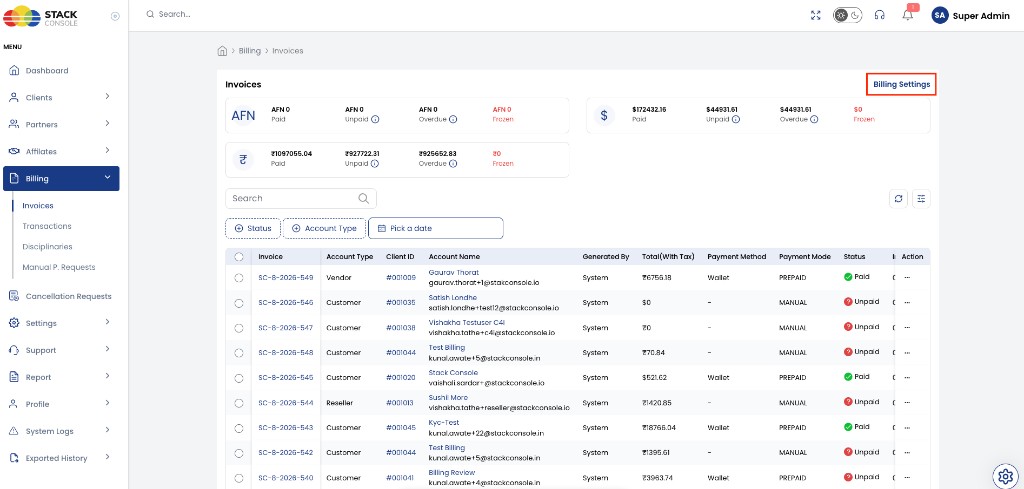
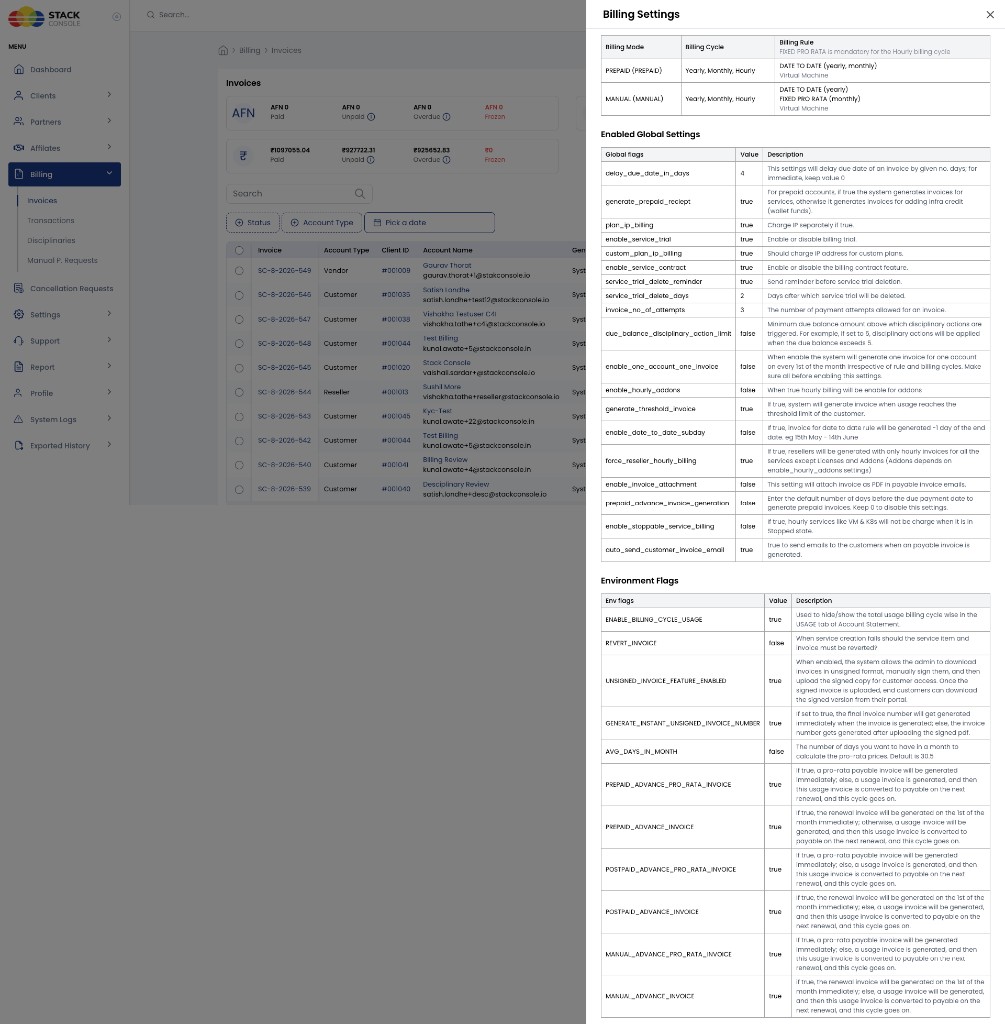
Open Billing Settings first to see values on this portal, then use the topic links below for behaviour and change procedures. This modal is primarily a read-only overview; most flags are changed in Global Settings, Payment Mode Settings, or with StackConsole support.
1. Billing Mode
Lists each enabled payment mode, the billing cycles it supports, and the billing rules applied (often per service type such as Virtual Machine).
| Column | Meaning |
|---|---|
| Name | Mode identifier and display name (for example PREPAID, MANUAL, POSTPAID) |
| Billing Cycles | Cycles available for that mode (for example Yearly, Monthly, Hourly) |
| Billing Rule | Rules such as FIXED PRO RATA (mandatory for Hourly) and DATE TO DATE for yearly/monthly VM contracts |
Example from a portal:
| Mode | Cycles | Rule notes |
|---|---|---|
| PREPAID | Yearly, Monthly, Hourly | FIXED PRO RATA mandatory for Hourly; DATE TO DATE (yearly, monthly) for Virtual Machines |
| MANUAL | Yearly, Monthly, Hourly | DATE TO DATE (yearly); FIXED PRO RATA (monthly) for Virtual Machines |
| Topic | Docs |
|---|---|
| Enable / disable modes per account type | Payment Mode Settings |
| Prepaid / Postpaid / Manual behaviour | Payment Modes · Prepaid · Postpaid · Manual |
| Cycles | Billing Cycles · Hourly · Monthly |
| Rules | Billing Rules · FIXED_PRORATA · DATE_TO_DATE |
2. Enabled Global Settings
Platform Global Settings (Billing category and related) that drive invoicing and customer behaviour. Values shown are the live values for this deployment.
In Global Settings the prepaid receipt flag is often stored as generate_prepaid_reciept (product spelling). The Billing Settings modal may display it as generate_prepaid_receipt. They refer to the same setting.
| Flag | Typical meaning | Docs |
|---|---|---|
generate_prepaid_receipt / generate_prepaid_reciept | Prepaid: true = invoices for services (Model 2); false = invoices for infra credit top-ups (Model 1) | Prepaid billing models · Usage Details |
enable_one_account_one_invoice | When true, one consolidated invoice per account on the 1st of every month (where supported) | One Account One Invoice (OAOI) · DATE_TO_DATE exception |
generate_threshold_invoice | When true, generate an invoice when the customer reaches the usage threshold | Threshold (Spending Cap) · Postpaid · Manual |
prepaid_advance_invoice_generation | Days before due date to generate prepaid invoices (when used) | Prepaid · Environment flags below for advance pro-rata / renewal |
enable_stoppable_service_billing | When true, hourly VMs / Kubernetes are not charged for compute while stopped (storage still bills) | Stoppable Services |
auto_send_customer_invoice_email | When true, email the customer when a payable invoice is generated | Invoice Settings · Multi-language — email templates |
plan_ip_billing | Deprecated. Default true. When true, public IP at VM create is billed separately from the VM package (recommended). Do not use false for new designs. | IP Address packages · Billing Overview |
| Service trial / free trial related flags | Control whether free trials are allowed platform-wide (enable_service_trial, reminder and delete-day settings) | Free Trials · Package Enable Free Trial · Account Statement — Free Trials |
| Contract-related flags | Enable service contract billing (quarterly+ with DATE_TO_DATE; postpaid/manual) | DATE_TO_DATE — service contracts · Annually — contracts |
| Invoice attempt / collection limits | Limits on invoice charge / collection attempts | Postpaid · Disciplinary Actions |
Your modal may list additional Global Settings not in this table. Treat the modal as the inventory for this portal; use Global Settings (or StackConsole) to change values.
Configure: Admin Panel → Global Settings (and related Billing Setup screens).
3. Environment Flags
Deployment / environment-level flags that control invoice generation timing and Account Statement usage display. Often set with StackConsole for the environment.
| Flag | Typical meaning | Docs |
|---|---|---|
ENABLE_BILLING_CYCLE_USAGE | When true, Account Statement Usage Details can show totals broken down by billing cycle (for example Hourly summary) | Usage Details · Customer Billing Dashboard |
UNSIGNED_INVOICE_FEATURE_ENABLED | When true, admins can download unsigned invoices, sign offline, and upload for customers | Invoice Settings · Invoice Details |
PREPAID_ADVANCE_PRO_RATA_INVOICE | Prepaid: true = pro-rata payable invoice immediately at creation; false = usage until conversion at renewal | Prepaid · Monthly — advance flags |
PREPAID_ADVANCE_INVOICE | Prepaid: true = renewal payable invoice on the 1st of the month; false = usage until conversion at renewal | Prepaid |
POSTPAID_ADVANCE_PRO_RATA_INVOICE | Postpaid: immediate pro-rata payable invoice at creation vs defer to renewal | Postpaid — advance invoice flags · Monthly |
POSTPAID_ADVANCE_INVOICE | Postpaid: renewal payable invoice on the 1st of the month vs defer | Postpaid |
MANUAL_ADVANCE_PRO_RATA_INVOICE | Manual: same pro-rata advance pattern as postpaid | Manual — advance invoice flags |
MANUAL_ADVANCE_INVOICE | Manual: renewal on the 1st of the month vs defer | Manual |
Changing Global Settings or Environment Flags after customers and services exist can cause billing inconsistencies. Prefer StackConsole support for production changes. See Prepaid — configure before go-live and Payment Mode Settings.
Where to change settings
| Area in modal | Change in CMP (typical) |
|---|---|
| Billing Mode | Settings → Billing Setup → Payment Mode Settings; cycles/rules via rate cards and billing rule config |
| Enabled Global Settings | Admin Panel → Global Settings |
| Environment Flags | Environment / deployment config (usually StackConsole) |
Also related setup:
| Topic | Path / docs |
|---|---|
| Rate cards & package cycles | Settings → Billing Setup → Rate Cards — Rate Cards |
| Payment gateways & currencies | Payment Gateways |
| Invoice branding, branches, tax | Invoice Settings |
How this affects the customer portal
| If Billing Settings shows… | Customer impact |
|---|---|
Prepaid + generate prepaid receipt false | Usage Details — Model 1 — cumulative from account creation |
Prepaid + generate prepaid receipt true | Usage Details — Model 2 — current open month |
| Postpaid / Manual | Usage Details — Postpaid/Manual |
ENABLE_BILLING_CYCLE_USAGE = true | Usage Details can show cycle totals (for example Hourly: $…) |
enable_stoppable_service_billing = true | Stopped hourly VMs / K8s pause compute charges — Stoppable Services |
| Auto Pay | Auto Pay |
Customer UI: Customer Billing Dashboard.